
Shared memory for LangGraph agents
By Aleksandar Nedelchev, Senior Software Engineer, LucidLink · 12 October, 2026 · 7 mins read
Modern agent frameworks offer "shared memory", a way for multiple AI agents to read and write to a common store. Letta attaches a single memory block to many agents, Mem0 tags each write with a scope, and LangGraph's Store persists JSON documents by namespace and key.
In each of these cases, the underlying store is a database that the operator can read. The scope is a row or a policy inside that database, and the author of a memory is a tag the agent self-reports without any oversight.
What changes when the store is a LucidLink Filespace instead of a database? There's no server to run, and the filespace enforces scope and authorship instead of application code.
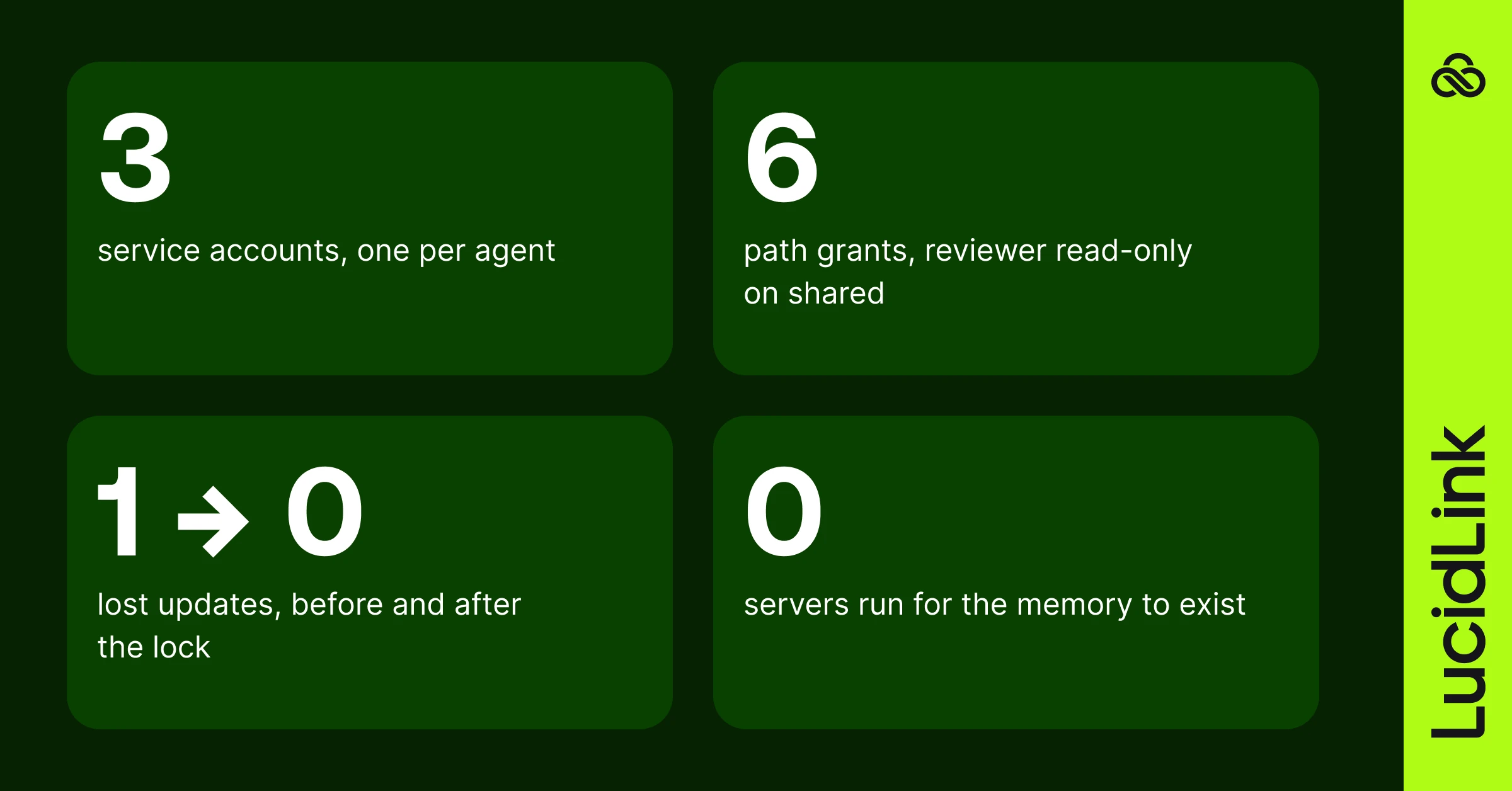
We built a shared memory and audit trail for 3 LangGraph agents to demonstrate how it works. Each agent has its own prompt, private directory, and service account for attribution in the logs. The adapter does no retrieval because LangMem or Mem0 sit on top of it unchanged. Everything below is verbatim from that run, with the complete working code on GitHub for anyone who wants to run it themselves.
lucidlink-mcp> read_audit_trail path_prefix=/memory time_range=10m # the run, 21:48:40–21:49:14, verbatim21:49:10 agent-reviewer FileCreate /memory/agents/reviewer/f6f8a405-0ae2-4a47-a158-e64c1304d501.json21:48:56 agent-analyst FileCreate /memory/shared/customers/63f40baa-cf31-43d4-959f-8fd83d0832c7.json21:48:42 agent-researcher FileCreate /memory/shared/customers/aa1d774a-d700-48f7-9641-27f7f195cbdf.json21:48:42 agent-researcher FileCreate /memory/shared/customers/a317684a-a4aa-4dc2-b98c-d257b6fca733.json21:48:42 agent-researcher FileCreate /memory/shared/customers/a653d373-b941-42e0-b673-7bf88d5aa610.jsonThree agents share one folder. Every write is attributed by the storage layer.
Setup
To set up the LucidLink Filespace as storage, we create a directory structure that follows LangGraph's namespace tuple and key model. The namespace tuple ("shared", maps to the / directory and its keys become files. At the same level as shared/ is an agents/ directory, with a private directory for each agent, similar to Mem0's scopes. The three agents are researcher, analyst, and reviewer.
/memory/├── shared/customers/ # researcher and analyst write here, reviewer reads└── agents/├── researcher/ # private; the other two cannot list it├── analyst/└── reviewer/
Next we use directory permissions to set up scopes for the agents. Every agent gets a filespace service account with the collaborator role, with no access to anything until we explicitly grant it. We added six grants in total: researcher and analyst have read/write access to the shared/ directory, reviewer has read-only access to the shared/ directory, and all agents have read/write access to their own private directories:
Path | Identity | Permissions |
|---|---|---|
/memory/agents/researcher | agent-researcher | read, write |
/memory/shared | agent-researcher | read, write |
/memory/agents/analyst | agent-analyst | read, write |
/memory/shared | agent-analyst | read, write |
/memory/agents/reviewer | agent-reviewer | read, write |
/memory/shared | agent-reviewer | read |
/memory/agents/researcher
Identity
agent-researcher
Permissions
read, write
/memory/shared
Identity
agent-researcher
Permissions
read, write
/memory/agents/analyst
Identity
agent-analyst
Permissions
read, write
/memory/shared
Identity
agent-analyst
Permissions
read, write
/memory/agents/reviewer
Identity
agent-reviewer
Permissions
read, write
/memory/shared
Identity
agent-reviewer
Permissions
read
Before running the agents, we checked what each identity can see and do, to confirm the scopes. The researcher sees ['memory'] as the filespace root and no other top-level folders. It only sees ['researcher'] under /. If the researcher tries to list /, the list fails with FileNotFoundError: The path is invalid, the same error a nonexistent path gives, because the path itself is unreadable without the decryption key, not just access-denied. Writing to it fails the same way. If the reviewer writes to the / folder, the write fails with PermissionError: Authorization exception, but reads succeed.
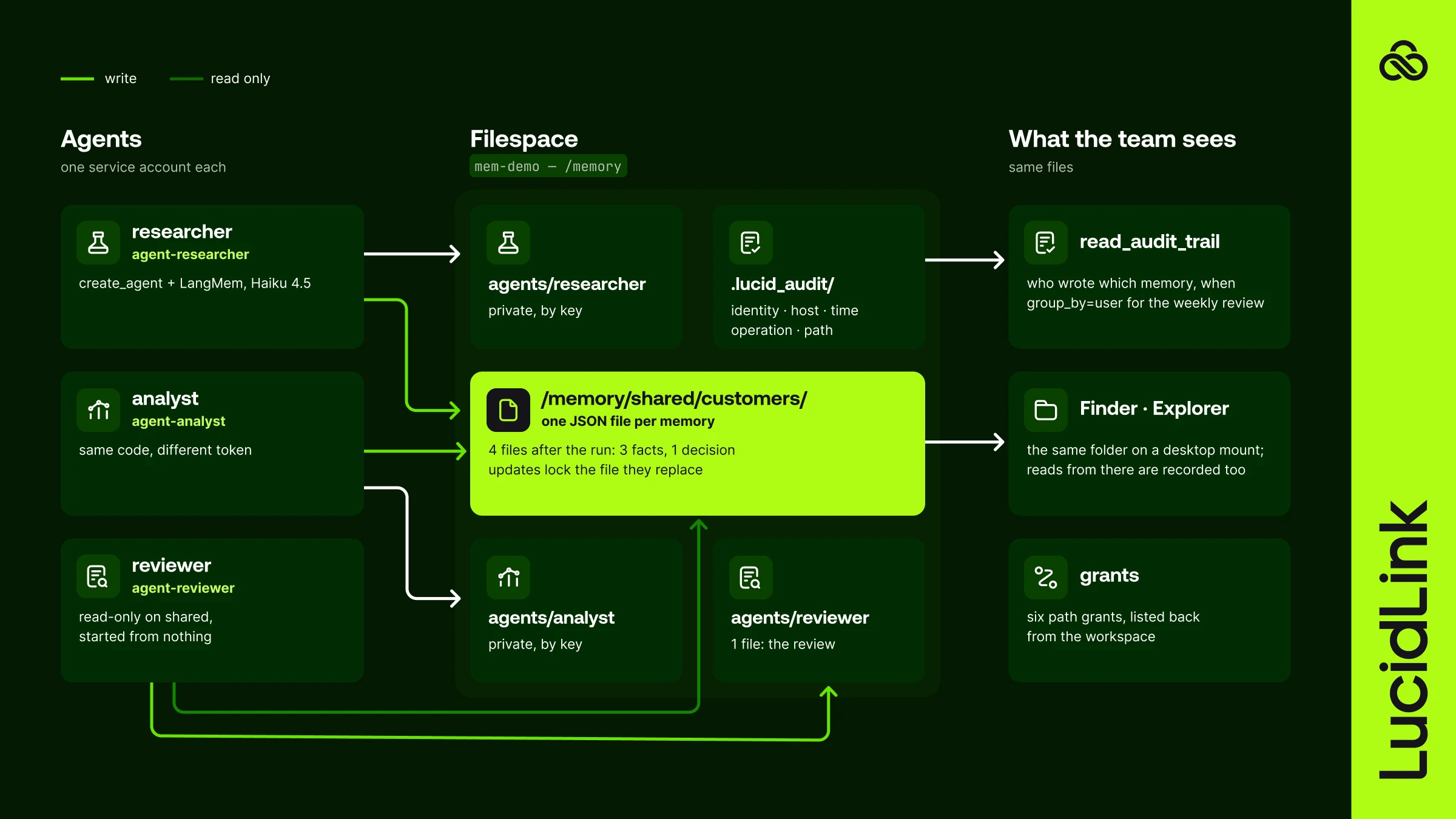
What ran. Three processes ran with three separate tokens and the same ~100 lines of Python. The filespace called mem-demo holds the memories. The directory permissions enforce the agents' scopes and the audit trail logs each operation with the agent that performed it.
The run
Each agent is a create_agent graph from LangChain that binds two or three LangMem tools to namespaces and points the store adapter at /. The agents use the Claude Haiku 4.5 model but any model works by configuring the LangChain provider:model string. The briefs in fleet_agent.py are the prompts we gave the agents. The tool calls are pulled from the log and the agent replies are trimmed only for length.
Brief to the researcher
You are the researcher on the Acme pricing project. Notes from today's call with Acme: they renewed early; procurement wants a single annual invoice; their fiscal year ends in March. Store what the fleet should remember about Acme in shared memory, one fact per memory, then reply with the keys you wrote.
Tool calls
manage_shared_memory(create, "Acme renewed their contract early.") → a317684a…manage_shared_memory(create, "Acme procurement requires a single annual invoice.") → a653d373…manage_shared_memory(create, "Acme's fiscal year ends in March.") → aa1d774a…
Agent-researcher
I've stored three facts about Acme in shared memory for the fleet: a317684a… Acme renewed their contract early. a653d373… Acme procurement requires a single annual invoice. aa1d774a… Acme's fiscal year ends in March.
Brief to the analyst
First search shared memory for what the fleet already knows about Acme. Then record your proposal in shared memory as a decision to move Acme to the annual tier with a single invoice, pending review.
Tool calls
search_shared_memory(query="Acme") → 3 memoriesmanage_shared_memory(create, "DECISION: Move Acme to annual tier with single invoice, pending review. Aligns with their procurement requirement for single annual invoice and early renewal.") → 63f40baa…
Agent-analyst
What the fleet already knows about Acme: renewed their contract early; procurement requires a single annual invoice; fiscal year ends in March. Decision recorded, key 63f40baa…: move Acme to the annual tier with a single invoice, pending review. This aligns with their stated procurement requirement and their early contract renewal.
Brief to the reviewer
You are the reviewer, new to the Acme pricing project, starting from nothing. Search shared memory for what the fleet knows about Acme and who proposed the pricing decision. You cannot write to shared memory; write your review to your own private memory.
Tool calls
search_shared_memory(query="Acme pricing project") → 4 memoriessearch_shared_memory(query="Acme pricing decision proposal") → 4 memoriesmanage_private_memory(create, "ACME PRICING REVIEW - REVIEWER NOTES …") → f6f8a405…
Agent-reviewer
I relied on three shared memories: the DECISION record showing the proposal to move Acme to annual tier with single invoice pending review, the record that Acme renewed early, and the record that Acme's procurement requires a single annual invoice. The decision appears operationally sound given customer constraints, though I've noted in my private review that pricing impact and precedent implications warrant examination.
The response from the reviewer doesn't include who proposed the decision because that information isn't in any memory document. Rather than trust agents to self-report authorship with no oversight, the filespace itself tracks who created each document.
The audit trail
LucidLink can record every file operation with the timestamp, the identity of the performer, the operation, and the path in an encrypted log. A filespace administrator has to enable the audit trail globally first. The same audit trail supports the weekly cross-audit that shared-memory governance guides ask for.
This is the output read for / after the run:
Time | Identity | Operation | Path |
|---|---|---|---|
21:48:42 | agent-researcher | FileCreate |
|
21:48:42 | agent-researcher | FileCreate |
|
21:48:42 | agent-researcher | FileCreate |
|
21:48:56 | agent-analyst | FileCreate |
|
21:49:10 | agent-reviewer | FileCreate |
|
21:48:42
Identity
agent-researcher
Operation
FileCreate
Path
shared/customers/ a653d373-….json
21:48:42
Identity
agent-researcher
Operation
FileCreate
Path
shared/customers/ a317684a-….json
21:48:42
Identity
agent-researcher
Operation
FileCreate
Path
shared/customers/ aa1d774a-….json
21:48:56
Identity
agent-analyst
Operation
FileCreate
Path
shared/customers/ 63f40baa-….json
21:49:10
Identity
agent-reviewer
Operation
FileCreate
Path
agents/reviewer/ f6f8a405-….json
The reviewer couldn't see that the shared/ document was created by agent-analyst at 21:48:56. The workspace issued the identity, which isn't a field in the document. The trail doesn't show lock operations but it does show the writes they protect.
The collision
This collision test checks whether the shared memory loses data when two identities, researcher and analyst, write to the same file simultaneously. To ensure a race window, a barrier holds both identities until they're both ready, then releases them together to read the file. The test completes with a check of whether both facts land in the filespace. Although collision.py makes direct filesystem calls compared to fleet_agent.py, which uses the _put method from the LucidLinkStore adapter (lucidlink_store.py), it exercises the same locking mechanism that the adapter uses internally.
Two options exist for running the test: take one runs it without exclusive locks, and take two runs it with each identity using an exclusive lock through the read and write.
Take one: read, think, write, no lock
Both agents read the file, wait for one second, append a fact, and then write the file. Without a lock, the second write wins and overwrites the first write. Every run results in only one write landing in the filespace and the other one being lost, which is how a shared folder works without coordination.
Take two: exclusive open, read through the handle, write_file, close
Both agents use a lock. The first writer opens the file with an exclusive lock, which then blocks the second writer's attempt to open the file. Across five runs, the second writer waited between 1.31 and 1.46 seconds (including the first writer's one-second think), read the first writer's fact through its own locked handle and then appended to it. Both facts got to the filespace on every run.
Where this differs, and where it doesn't
This table compares LucidLink against four other approaches to agent memory: Letta's shared blocks, Mem0, LangGraph Store on Postgres, and managed memory services.
Question | Letta shared blocks | Mem0 | LangGraph Store on Postgres | Managed memory services | LucidLink Filespace |
|---|---|---|---|---|---|
Can the operator read the memory? | Yes | Yes | Yes | Yes | No |
How scopes are enforced | Block attachment | Scope tags and policy | Database roles | Cloud IAM | Keys; an unscoped agent can't list the folder |
Who wrote it | agent_id tag | Scope tag | Not built in | Cloud identity | Workspace-issued identity, host, time, in the trail |
Semantic retrieval | Yes | Yes | Optional | Yes | No; LangMem or Mem0 on top |
Change notification | Server | Server | Poll or DB | Managed | Pull, seconds |
Servers you run | Letta server | SaaS or self-host | Postgres | None, managed | None |
A person in the same store | No | No | No | No | Yes, the mount |
Memory sits next to the files it's about | No | No | No | No | Yes, same filespace |
Can the operator read the memory?
Letta shared blocks
Yes
Mem0
Yes
LangGraph Store on Postgres
Yes
Managed memory services
Yes
LucidLink Filespace
No
How scopes are enforced
Letta shared blocks
Block attachment
Mem0
Scope tags and policy
LangGraph Store on Postgres
Database roles
Managed memory services
Cloud IAM
LucidLink Filespace
Keys; an unscoped agent can't list the folder
Who wrote it
Letta shared blocks
agent_id tag
Mem0
Scope tag
LangGraph Store on Postgres
Not built in
Managed memory services
Cloud identity
LucidLink Filespace
Workspace-issued identity, host, time, in the trail
Semantic retrieval
Letta shared blocks
Yes
Mem0
Yes
LangGraph Store on Postgres
Optional
Managed memory services
Yes
LucidLink Filespace
No; LangMem or Mem0 on top
Change notification
Letta shared blocks
Server
Mem0
Server
LangGraph Store on Postgres
Poll or DB
Managed memory services
Managed
LucidLink Filespace
Pull, seconds
Servers you run
Letta shared blocks
Letta server
Mem0
SaaS or self-host
LangGraph Store on Postgres
Postgres
Managed memory services
None, managed
LucidLink Filespace
None
A person in the same store
Letta shared blocks
No
Mem0
No
LangGraph Store on Postgres
No
Managed memory services
No
LucidLink Filespace
Yes, the mount
Memory sits next to the files it's about
Letta shared blocks
No
Mem0
No
LangGraph Store on Postgres
No
Managed memory services
No
LucidLink Filespace
Yes, same filespace
LucidLink is the only approach where the operator can't read the memory (first row). Other strengths are scope and attribution enforcement (second and third rows). The gap for the retrieval (fourth row) is because the adapter's search returns the namespace and ignores the query text, which works for four memories but isn't a search capability. This gap can be filled by putting an index like LangMem or Mem0 on top. Separately, the collision handling is at parity with Letta's validated replace and not a differentiator.
The code
The full example is lucidlink-agentic-examples/fleet-memory on GitHub: lucidlink_store.py, fleet_agent.py, collision.py, run_fleet.sh and a README with the setup.
lucidlink_store.py
The adapter, lucidlink_store.py, is one class over the Python SDK. LangGraph's BaseStore needs batch over four operation types. The update path follows the same pattern from the collision.py file.
def _write(self, path: str, value: dict[str, Any], created_at: str, updated_at: str) -> None:doc = {"value": value, "created_at": created_at, "updated_at": updated_at}self.fs.write_file(path, json.dumps(doc, ensure_ascii=False).encode())def _put(self, namespace: tuple[str, ...], key: str, value: dict[str, Any] | None) -> None:path = self._path(namespace, key)if value is None:with suppress(FileNotFoundError):self.fs.delete(path)returnself._mkdirs(namespace)now = datetime.now(timezone.utc).isoformat()try:with self.fs.open(path, "r+b", lock_type="exclusive") as f:created_at = json.loads(f.read()).get("created_at", now)self._write(path, value, created_at, now) # write_file, not f.write: the audit trail attributes itexcept FileNotFoundError:self._write(path, value, now, now)def batch(self, ops: Iterable[Op]) -> list[Result]:results: list[Result] = []wrote = Falsefor op in ops:if isinstance(op, PutOp):self._put(op.namespace, op.key, op.value)wrote = Trueresults.append(None)elif isinstance(op, GetOp):results.append(self._get(op.namespace, op.key))elif isinstance(op, SearchOp):results.append(self._search(op))elif isinstance(op, ListNamespacesOp):results.append(self._namespaces()[op.offset : op.offset + op.limit])else:raise NotImplementedError(type(op).__name__)if wrote:self.filespace.sync_all() # make the writes visible to every other clientreturn results
fleet_agent.py
The agent script, fleet_agent.py, is identical for all three roles; only the service-account token and the brief differ. It links the adapter into a create_agent graph, binds the shared and private memory tools by namespace, and withholds the shared-memory write tool from the reviewer.
ROOT = "/memory"SHARED = ("shared", "customers")MODEL = os.environ.get("FLEET_MODEL", "anthropic:claude-haiku-4-5-20251001")client, filespace = open_filespace(args.token_file or f"~/.lucidlink/agent-{args.role}.token")store = LucidLinkStore(filespace, root=ROOT)tools = [create_search_memory_tool(namespace=SHARED, name="search_shared_memory"),create_manage_memory_tool(namespace=("agents", args.role), name="manage_private_memory"),]if args.role != "reviewer":tools.append(create_manage_memory_tool(namespace=SHARED, name="manage_shared_memory"))agent = create_agent(init_chat_model(MODEL, temperature=0), tools, system_prompt=SYSTEM, store=store)result = agent.invoke({"messages": [{"role": "user", "content": BRIEFS[args.role]}]})
Run it yourself
- If you don't already have a LucidLink account, register for one and create a filespace.
- Mint one service account per agent with the collaborator role, from the admin tools or the MCP server's admin toolset. Save each token as
~/, mode 0600, and don't export it into the environment..lucidlink/ agent-<role>.token - Create the
/layout and grant each identity its folders. Verify that directory listings from each identity are correct.memory - Get the code from GitHub, run
pip install -r requirements.txt, and setLUCIDLINK_FILESPACEandANTHROPIC_API_KEY. For another model, install the corresponding LangChain package and setFLEET_MODELto itsprovider:modelstring. - Enable the audit trail log. See this article: Audit Trail with New LucidLink.
- Run
python collision.py take1, thentake2. The second take is meaningful only after the first. - Run
./for the three agents, then read the audit trail.run_fleet.sh
Useful links
Build with LucidLink
Give your scripts, agents and team one shared filespace to work in. Start a free trial, then connect through the API, Python SDK or MCP Server.